In PDF Extra Mod APK, get all of the PDF features you need in one app, all at the same time.


PDF Extra v11.18.270982 MOD APK (Premium Unlocked)
| App Name | PDF Extra |
|---|---|
| Publisher | MobiSystems |
| Genre | Business |
| Size | 77.8M |
| Latest Version | 11.18.270982 |
| MOD Info | Premium Unlocked |
| Get it On |

|
This PDF Extra MOD APK provides a build where the premium features are unlocked for the user. It removes the restrictions associated with the free version to allow access to the full suite of document management and editing tools provided by MobiSystems.
What’s Modified in PDF Extra
- Premium Unlocked: Grants access to all paid features including advanced editing, PDF conversion, and OCR scanning without requiring a subscription.

|

|
This build is version 11.6.297620, has a file size of 72M, and uses the package name com.mobisystems.mobiscanner; because it is re-signed, it cannot be installed as an update over the official store version.
About PDF Extra
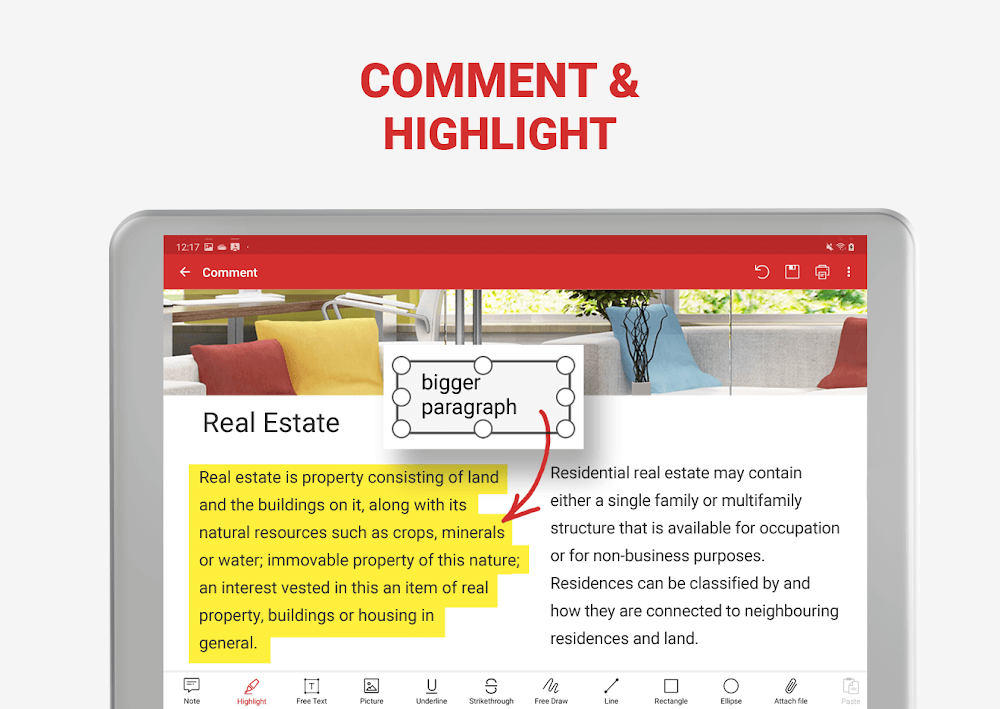
PDF Extra is a comprehensive utility designed to facilitate a smooth workflow for users dealing with digital documents. Developed by MobiSystems, it addresses common difficulties associated with PDF management by providing a set of tools that range from basic viewing to complex editing. One of the primary functions of the application is the ability to customize files directly on a mobile device. Users can add stickers and notes to their documents through specific commands, which serves as a method for marking important information or leaving comments for collaborators. These annotation tools are integrated into the interface to ensure that reading and interacting with files is intuitive. Furthermore, the application allows for the filling and signing of forms. Any changes made to these forms, including digital signatures or text entries, are saved directly to the file, ensuring that the document remains updated and ready for professional use.
Beyond simple annotations, the app focuses heavily on the digitization of physical documents. The scanning feature is a core component, allowing users to transform paper records into digital files. Once information is digitized, the application offers various processing options to streamline the management of these files. For instance, the system supports both single-page PDFs and batch scanning, where a dozen pages can be consolidated into a single file. This is complemented by an advanced OCR scanner that uses the device’s camera to convert paper documents into editable formats. Once a document is ready, the printing functionality provides flexibility, allowing users to print the entire document or manually select specific items and pages. The system is designed to handle these requests efficiently, maintaining the integrity of the layout throughout the process.
Information management and security are central themes within the application’s design. PDF Extra enables users to manage both local and distant documents, providing a centralized location for files stored on the device or in the cloud. The My Documents section acts as a hub for navigation, while cloud synchronization ensures that files are accessible across different platforms. To protect sensitive data, the app includes security features such as password locking and encryption. These tools limit access to important information and allow users to validate the authenticity of advanced PDF certificates. Additionally, the application supports backup routines that happen quickly, ensuring that data is not lost during the editing or conversion process. Users can also use the Share to PDF Extra tool to pull photos from other applications and convert them into PDF format instantly.
The software also serves as a versatile conversion tool, supporting various file formats to enhance compatibility and sharing. It includes a free JPEG converter for turning PDF pages into pictures and allows for the conversion of PDFs into Word, Excel, or ePub files. Crucially, the app is designed to preserve the original layout and formatting during these transitions, which is vital for professional documents that rely on specific structures. Conversely, users can save Word, Excel, and ePub files back into PDF format. For those who use the app for reading, a dedicated Dark mode is available to reduce eye strain. This is paired with a unique Text to Speech feature that can read e-books or documents aloud, effectively turning text into an audio experience. This listening mode is particularly useful for users who prefer consuming content through voice rather than traditional reading.

|

|

|
Editing capabilities in PDF Extra are described as sophisticated, offering control over almost every component of a document. Users can modify text, images, and signatures, as well as manage certifications within the mobile editor. The structural management of PDF files is also a key feature, giving users the power to rearrange the order of pages, rotate them for better orientation, or delete unnecessary pages entirely. This level of control is essential for building well-organized files from disparate sources. The app also simplifies the process of merging numerous PDFs into a single document, which is helpful for organizing plane credentials, cinema tickets, or adding new pages to an existing collection. By providing these tools, the application aims to provide a unique space for both professional work and personal document organization.
The application’s interface is built to support a wide range of operations, from simple navigation to complex file manipulations. Sticky notes and drawing tools are available for those who need to mark up documents manually, while the annotation tools provide a more structured way to highlight text. The inclusion of fillable PDF forms with advanced support means that users can sketch a signature directly on the page or use a stored digital signature for quick approvals. Every update to the app brings new features, such as the ability to automatically upload information to the cloud or the development of outline features to improve document navigation. These continuous improvements ensure that the app remains a relevant tool for anyone needing to manage digital documents on the go, whether for work, education, or personal projects.
Key features
- OCR scanner for converting paper documents to editable PDF files
- Text to Speech functionality for reading e-books and documents aloud
- PDF conversion to and from Word, Excel, and ePub formats
- Advanced annotation tools including stickers, notes, and drawing tools
- Form filling and digital signature support for mobile document processing
- Cloud synchronization and management for local and remote files
- Security features including password protection, encryption, and certificate validation
- Batch scanning for creating multi-page PDF documents from the camera
- Page management tools for rotating, deleting, and rearranging PDF structures
- JPEG converter for turning PDF pages into image files
Related MOD APKs
FAQ
Is Premium unlocked in PDF Extra MOD APK?
This PDF Extra 11.6.297620 build includes Premium Unlocked. It functions similarly to the MobiSystems original, with features available immediately after installation.
What is the latest version of PDF Extra MOD APK?
Version 11.6.297620 matches the MobiSystems release from March 20, 2025. We don’t keep older versions here. Update by installing this file over your current app; if you see a signature error, delete the old app first.
Is PDF Extra MOD APK safe to download?
This PDF Extra 11.6.297620 build from MobiSystems features Premium Unlocked. 95 people gave it a 4 rating. It does not require root. Ignore Play Protect warnings during setup, but always download from this page.
Can I use PDF Extra MOD APK on PC or iPhone?
You cannot install this on an iPhone. To use the 72M file on a computer, use an emulator like BlueStacks or LDPlayer. Simply set up the emulator and then drag the file into it.
PDF Extra v11.18.270982 MOD APK (Premium Unlocked) Download
Download (77.8M)You are now ready to download PDF Extra for free. Here are some notes:
- Please read our MOD Info and installation instructions carefully for the game & app to work properly
- Downloading via 3rd party software like IDM, ADM (Direct link) is currently blocked for abuse reasons.
4/5 (95 votes)