VMOS PRO is an application that creates a virtual system on your device to prevent the entry of viruses or data theft when accessing some standard websites with the device.


VMOS PRO v3.0.1 APK + MOD (Premium Unlocked)
| App Name | VMOS PRO |
|---|---|
| Publisher | VMOS | App Cloner |
| Genre | Tools |
| Size | 55M |
| Latest Version | 3.0.1 |
| MOD Info | Premium Unlocked |
| Get it On |

|
MOD Info
★★★ MOD by Shadow_Patcher ★★★
1. Fix some compatibility issues
2. Update SDK and ROM package version
3. Add VMOS assistant activation function
4. Optimize some experience issues
5. Unlock Premium ( Forever )
Note:
Only for arm64-v8a
Need register and login
If it is stuck on the startup screen and cannot enter > close the app and open it again !
Special thanks to ibadifal
Release: Shadow_Patcher
★★★ MOD V2 ★★★
Update content:
1. Fixed Assistant Activity & Buggy
2. Unlock Premium ( Forever )
Note:
Only for arm64-v8a
Need register and login
Need new account register
If it is stuck on the startup screen and cannot enter > Close the app and open it again !
Special thanks to ibadifal
Release : Shadow_Patcher
VMOS PRO offers everyone the useful and convenient potential of operating two independent windows running side-by-side on one monitor. It also has extensive support for many programs, applications, and games so that users can maximize every time to be more productive while multi-tasking. Of course, it comes with comfortable and straightforward interaction so that everyone has the best user experience, even when running multiple programs simultaneously.
 |
 |
SIMPLE INTERFACE FOR QUICK SET UP
The friendly interface is the first advantage of the application for users to quickly start or prepare the necessary processes and applications to start parallel operation. User interaction is also fluid and comfortable, making it easy to navigate between windows without much distraction.
DUAL WINDOWS OPERATION FOR MULTI-TASKING
The main capability of the application is to allow the user to select two independent programs and operate them in parallel in various modes. Depending on the priority of the windows, they can put them first, like games on applications and vice versa for convenience of interaction.
WIDE RANGE OF CUSTOMIZATION FOR WINDOWS
Besides helping users run two programs independently, each window comes with extensive and in-depth customization. They mainly help the interaction or display change significantly to suit the usage experience of different people depending on the programs they are using.
PERSONALIZE THE SHORTCUTS FOR QUICK ACCESS
Users can personalize any system related to parallel operation, including prioritizing other important applications or programs. People can also directly change each window through a small bubble at the edge of the screen, representing absolute flexibility.
PLAY GAMES WITHOUT INTERRUPTION
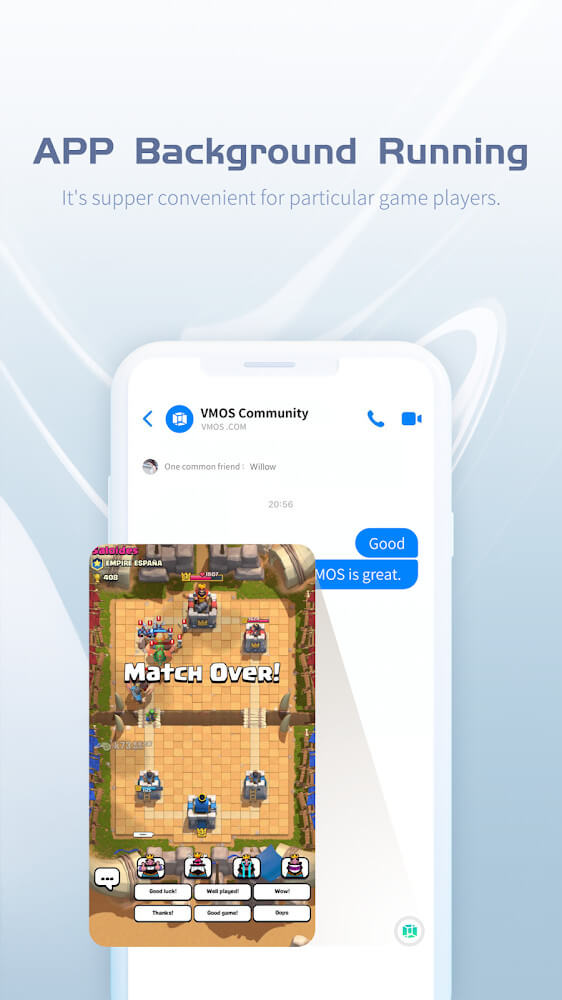
Thanks to real-time parallel operation, the system can keep everything running even if the user minimizes a window. That helps all progress to continue, as usual, is an effective choice if users want to play while working to maximize their time effectively.
 |
 |
OUTSTANDING BUILT-IN SYSTEM OPTIMIZATION
The system optimization function is an add-on from the application to keep the device stable after continuously running all the programs in parallel. That includes getting rid of apps running in the background, making the device as comfortable as possible, and making syncing faster than usual.
VMOS PRO will open up new possibilities for people to run multiple programs at once and help them maximize their work or game performance so they can get everything done.
MAIN FEATURES
- Outstanding performance optimization while helping users run two programs separately on various windows without interruption.
- Intuitive interface packed with modern features for smooth interaction or a quick set for users has the best feelings.
- Operate all programs simultaneously in real-time with multiple options for each window to maximize users’ capability in any situation.
- Wide range of customizations related to window settings or shortcut personalizations for quick access to users’ favorite programs.
- In-app system optimization to stably the system or cooling the device while maintaining the performance in an absolute manner.
VMOS PRO v3.0.1 APK + MOD (Premium Unlocked) Download
Download (55M)You are now ready to download VMOS PRO for free. Here are some notes:
- Please read our MOD Info and installation instructions carefully for the game & app to work properly
- Downloading via 3rd party software like IDM, ADM (Direct link) is currently blocked for abuse reasons.
3.9/5 (246 votes)