As you master your large screen, you’re at ease! Mobile mastery means no more stretching. Just use a virtual touchpad for precise one-handed navigation.
As you master your large screen, you’re at ease! Mobile mastery means no more stretching. Just use a virtual touchpad for precise one-handed navigation.
| App Name | Touchpad for Big Phone |
|---|---|
| Publisher | mPointer |
| Genre | Productivity |
| Size | 8M |
| Latest Version | 1.5.7 |
| MOD Info | Premium Unlocked |
| Get it On |

|
The Touchpad for Big Phone MOD APK provides access to premium features that are typically restricted in the standard version. This build allows users to utilize the full range of customization and shortcut tools without needing to purchase a separate license.
This build is version 1.5.7 with a file size of 8M and package name com.mpointer.touchpad.bigphones; it is a re-signed file that cannot be installed as an update over the official store version.
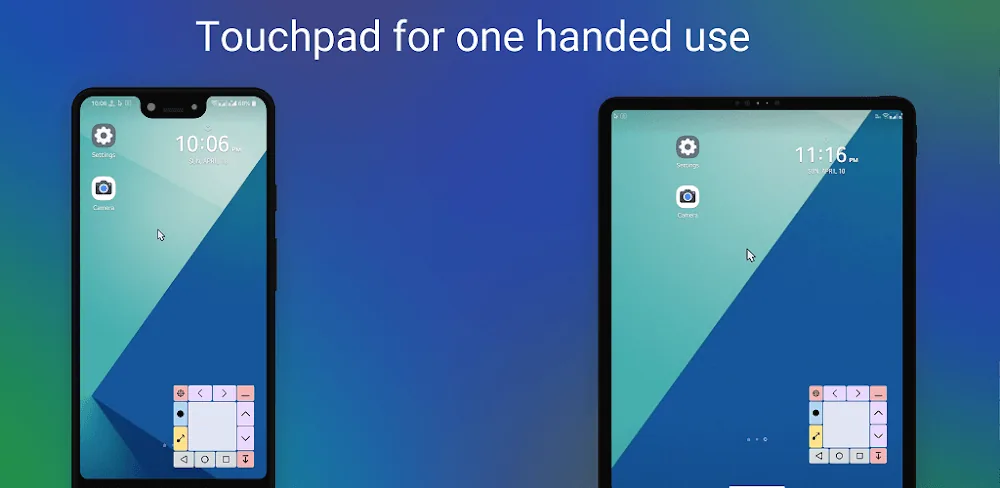
The increasing physical size of mobile devices poses various usability issues. For example, the inability of many people to physically reach the top of a display creates a problem when using the larger mobile devices. This app provides a solution to that problem. A touchpad is placed at the bottom of the display. The touchpad is used to control a desktop mouse pointer. By using the touchpad, the user is able to use their thumb in a natural position to control a mouse pointer to reach any location on the display. The application restores one-handed usage of a mobile device, which was prevalent in smaller mobile devices.
Although the major function of the application is to give users a more ergonomic approach to controlling their devices, a secondary function of the app is to provide an interface that is easy to modify to the users preferences. As mentioned before, the touchpad can be adjusted to different levels of transparency to reduce its obstruction of background apps. The touchpad and the mouse pointer can be changed to different colors to increase visibility when used on top of certain wallpapers. The size of the touchpad can be adjusted. A variety of cursor icons are also available.
The team worked to make the mechanics of interacting with the app as precise as a laptop trackpad. With the touch of a finger on the overlay, the app registers a click at the location of the cursor. Scrolling is achieved by using one of the touchpad zones that are located elsewhere on the screen. Like a laptop trackpad, the app can simulate a long press touch, as well as a drag and drop gesture. These features can prove especially useful when performing a file management task or when moving app icons on the home screen. To ease the user’s stress, especially during extensive use, the features in the app are designed to be very responsive, thereby guaranteeing that every click and swipe will be registered.
The app also provides a number of intelligent shortcuts and navigation keys to facilitate movement of the cursor. A side bar, placed to the left of the screen, contains the Android navigation buttons. A touchpad zone to perform system tasks, such as adjusting the system volume or locking the device, is strategically placed to reduce the movement required to accomplish those tasks.
A core feature is intelligent visibility control, which manages the touchpad based on the user’s current activity. The app can automatically change the visibility of the touchpad to block the screen obscuring navigation tools, which is handy in video and game mode. Immersive experiences can be ruined by navigation tools, which is why the app places all important controls at the bottom of the screen. This strategy can help alleviate hand strain and reduce the risk of dropping the device, since the user will not need to adjust their grip to reach controls at the top of the screen. This app is especially handy for users with limited hand mobility as it allows users to fully utilize large phones and tablets.
The app is geared towards people that use their large screen devices as mobile workstations. Mobile tasks usually require users to interact with many UI elements and control management in an efficient way. This app helps users gain the same sort of control they have while sitting at a desk when using their large screen devices. This app is positioning to change the way users interact with their large mobile devices by ensuring that users are in charge of how they interact with their devices. Every touch and slide is done to put complete control in the hands of the user.
Related MOD APKs
Is Premium unlocked in Touchpad for Big Phone MOD APK?
This 1.5.7 version of Touchpad for Big Phone includes Premium Unlocked. It functions similarly to the mPointer release, with all features active immediately after you finish the installation.
What is the latest version of Touchpad for Big Phone MOD APK?
This 1.5.7 build matches the mPointer release from June 1, 2026. We don’t keep older versions here. To update, install this file over your current app; if you see a signature error, delete the old version first.
Is Touchpad for Big Phone MOD APK safe to download?
This 1.5.7 version of Touchpad for Big Phone from mPointer features Premium Unlocked. 28 users gave it a 3.6 rating. It does not require root. Ignore Play Protect warnings during setup, but always download from this page.
Can I use Touchpad for Big Phone MOD APK on PC or iPhone?
Since this is an Android file, it cannot run on iPhone. To use the 8M APK on a computer, install an emulator like BlueStacks or LDPlayer, then drag the file into the software to start.
You are now ready to download Touchpad for Big Phone for free. Here are some notes: