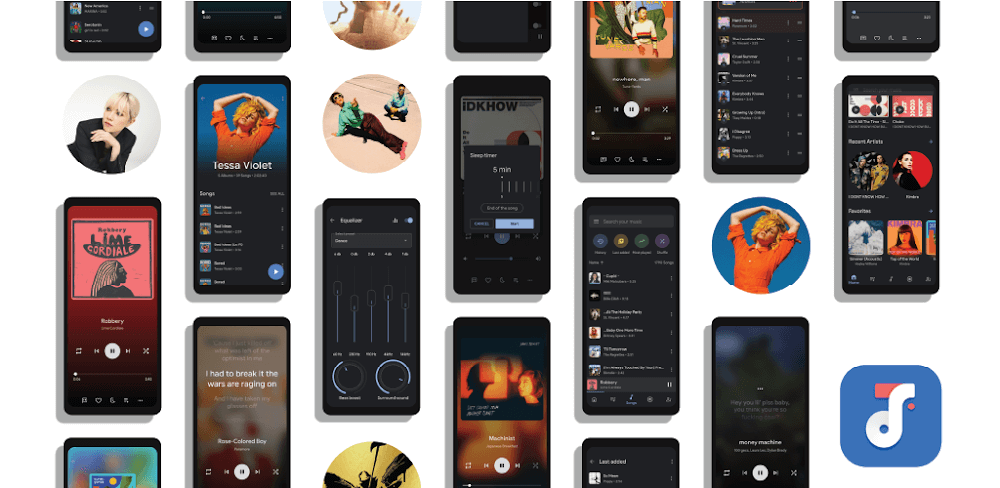



This Oto Music MOD APK provides an unlocked premium experience, allowing users to access the full range of features without the standard limitations found in the base version. It focuses on delivering the complete set of audio management and playback tools immediately upon installation.
What’s Modified in Oto Music
- Unlocks the premium feature set to provide full access to all application capabilities.
This build is version 4.3.1 with a file size of 7M under the package name com.piyush.music, and because it is re-signed, it cannot be installed over an existing version from the official store.
About Oto Music
Oto Music, created by Piyush M., is an audio player exclusive to the Android platform. For users who have a local music library, Oto Music offers features such as organizing and playing music files that are located on the user’s device. The software supports numerous formats of audio files, thus allowing it to be a universal player for any kind of collection. The developer of Oto Music, Piyush M., created the software to fill the gap between easy to use music players and players with traditional and more complex features that are required by expert users for the management of large digital collections. After the first run of the software, it does a thorough scan of the storage of the device for all the audio files. This feature allows the software to quickly and automatically create a catalog of audio files, and allows the user to access their music without having to look for the files manually.
The playback engine within Oto Music includes features to provide a high quality listening experience.
A missing feature found in many music players is Gapless Playback. This feature eliminates silent gaps between tracks found in albums and continuous live performances. The application utilizes fade in/fade out features to provide a smoother transition between tracks. These mechanics increase/decrease the volume on the tracks, respectively.
For custom equalization, Oto Music, offers a built-in equalizer that allows users to manipulate music tracks to produce the desired effects. This equalizer gives users the ability to add adjustable sound effects and work in conjunction with the various other sound improvements tools to provide the best possible experience.
The Oto Music app helps to organize audio files and provides tools to work with big audio file libraries. Scanned files can be altered and organized by the user. Flexible organization of files gives users the ability to manage their music the way they see fit. Users are allowed the ability to organize their music the way they want and move their playlists between different locations. Users can also modify their music in various ways to help organize their libraries. The software helps save time by providing ways to dynamically sort the music library. The tools can help identify specific tracks and albums quickly when faced with thousands of files. The software interface helps the user organize their files in numerous ways. The layout incorporates elements of a traditional music player with more modern methods of organization. The software helps quickly organize, categorize, and identify music files, saving time and effort.
In addition to the handheld device, Oto Music has several other useful features. It works with a lot of third-party hardware and external systems. It works with Android Auto, which lets users connect to their music library and manage their playback through their vehicle’s infotainment system. This feature also provides the same sorting options and playlists available on the user’s phone. The app also supports casting to different smart devices like Chromecast and Smart TVs. This means that users can use the Oto app to play back locally stored audio files through their home theater systems. The app can act as the central hub for listening both at home and on the go. The app also identifies and supports casting to Chromecast dongles and Smart TVs.
The user interface allows quick access to both basic and advanced settings. The application uses elegant widgets that users can place on their device’s home screen for immediate access to basic settings such as track control (play/pause or skip tracks) and playback controls. The application provides an interface for playlist management and control of playback sequence. More advanced settings include the tools and settings described above for enhancing sound quality. The designers opted for a simple and elegant interface that users can quickly adopt for audio control, while also giving users the ability to control their audio with enough detail for quality management of their audio environment. Users can be sure their audio settings are adjusted for maximum quality based on their current surroundings.
Compatibility is an essential part of the software design to accept and process almost all audio file types in use. So whether the user has standard MP3s, WAVs, or some obscure high-fidelity formats, the software is likely to scan and play them, meaning you don’t need conversion tools. The software is designed to scan several audio file types at the same time, meaning user’s entire music library is represented accurately and extensively in the software. By providing users the ability to play back files, edit them, and organize them the way they want, Oto Music serves as an end-to-end solution to manage audio files on your computer. Users can access all the playback features and modify the music library the way they want, and the playback features remain available to the users at all times, including when the music library is being navigated or modified. Users can also easily access the accessibility options integrated into the software.
Key features
- Scanning and unlocking of all local audio files
- Built-in equalization for sound fine-tuning
- Gapless Playback for continuous audio
- Fade-in and fade-out transitions
- Android Auto compatibility
- Chromecast and Smart TV support
- Moveable and transferrable playlists
- Home screen widgets for playback control
- Support for various audio file types and formats
- Sorting options for library management
Related MOD APKs
FAQ
Is Premium unlocked in Oto Music MOD APK?
Modified to include Premium Unlocked, this 4.3.1 version of Oto Music performs just like the official Piyush M. release. Features are active immediately after you install.
What is the latest version of Oto Music MOD APK?
Version 4.3.1 matches the Piyush M. release last updated on February 13, 2025. We don’t keep older versions here. To update, install this build over your existing one; if you see a signature conflict, uninstall the old app first.
Is Oto Music MOD APK safe to download?
By modifying only the Premium Unlocked features, this 4.3.1 build of Oto Music on MODYOLO by Piyush M. works like the original. 26 users rated it 3.6/5. It does not require root. If Play Protect warns you, remember to always download from this page.
Can I use Oto Music MOD APK on PC or iPhone?
Because this is an Android package, it won’t work on iPhone or iPad. To use the 7M APK on Windows or macOS, install an emulator like BlueStacks or LDPlayer, then drag the file into the program.