
This AOA MOD APK provides access to the premium features of the application by unlocking the Pro version. It removes the limitations found in the standard build to allow for full customization of the always-on display interface.
What’s Modified in AOA
- Pro Unlocked: Grants access to all premium features, including advanced themes and customization options that are restricted in the standard version.
 |
 |
This AOA MOD APK is version 7.2.1 with a file size of 23M and the package name com.newgen.alwayson; it is a re-signed file and cannot be installed over a version downloaded from the official store.
About AOA
AOA: Always On Display is a utility to help users maximize use of their mobile device when idle. The app displays information in an always-on interface even when the device is locked. Rather than using a high-intensity light setting like a standard lock screen, which causes high drain on the battery, AOA uses a low-intensity light setting, drastically reducing the battery drain. The app uses the always-on feature of the device’s screen to display information. Because not all Andriod devices support this feature, the app uses an array of other features to provide customizability, therefore supporting a wide range of Andriod hardware, including tablets. The app makes the always-on, state of the device and its communications, available without the user ever touching the hardware to wake the device.
The app offers a notifications system that’s more effective than the standard system settings, and that’s where the app gets a large part of its value. With the standard system, users need to take a couple of steps to see a notification: press the power button or double tap the screen to wake the phone, then swipe to unlock it. Users with a lot of notifications receive throughout the day, end up wasting a lot of time doing the previous steps. AOA: Always On Display solves that with a system that projects notifications as they come, that way the user can see who’s trying to reach them or what’s trying to get their attention with a simple, and quick, glance. The company’s goal with their product is to provide a more effective way to get the information users want quickly and reduce the amount of time the device has to be fully waken for simple, repetitive tasks.
The application is designed to show a variety of information, from traditional time management to more complex media and environmental data. Basic time management information is displayed in the form of a clock. Clocks are among the most requested pieces of information on a locked device. The application extends basic time management features to provide control of music, as well as a summary of the weather and date. Music controls permit the user to manage music playing on their device, including the ability to pause and skip tracks, all from the application’s always-on interface. While the app’s extensibility to more complex data (i.e., environmental and media data) is an exciting feature, the core of the application is to provide users with a always-on, smart environment. By including a summary of the weather, time, and date, the application facilitates a user’s access to critical information and other environment controls.
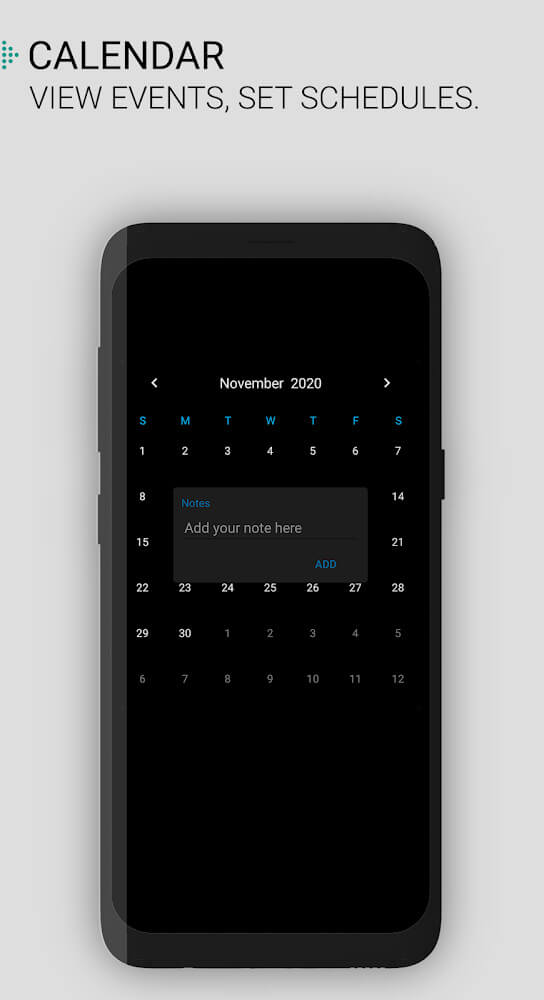
The application offers different display modes and themes to cater to varying phone usage styles. These modes can be found in the settings, and users can easily choose the mode most suitable for them. For example, a mode can be set to display the time in a big, bold way. This mode is usually set by someone who is not always looking at their phone, or someone who is always on the move and needs to know the time at a glance. For someone who is always on the move, but is outdoors a lot and is always subjected to different weather conditions, a mode that displays the weather is probably more convenient. This application also offers a calendar-based mode to display upcoming events and schedules for the users. This mode is probably most convenient for teachers and students, who have to plan their days with classes and other activities.
 |
 |
Aside from the many useful features the application has, edge lighting is an aesthetic improvement to the phone. Edge lighting is a feature that, when turned on, makes the phone’s screen edge light up with a color of the user’s choice. Edge lighting provides a pretty way to show that the phone is in use and monitoring for notifications. Overall, this application is pretty useful for everyday use and gives users a personalized way to showcase their style.
This application is made to be fully compatible with almost all popular devices. As Android is a flexible OS, the software can optimize to get the best performance and display qualities for a given hardware it is installed on. So, no matter if the user has a high-end phone or a standard tablet, the application takes advantage of the hardware to offer low-light display as well as edge lighting features if available. This approach allows a large population of users to benefit from the notifications management features of the application as well as other customization features. With the ability to theme the application and control other media without actually touching the device, users can get the latest alerts as well as view important data without actually touching the device. This makes it an utility application.
Key features
- Always-on display with low light output
- Lock screen notification visibility
- Analog and digital clock display
- Integrated music control interface
- Current weather information display
- Date and event-focused display modes
- Customizable themes for varied layouts
- Edge lighting with multiple color options
- Compatibility with Android phones and tablets
Related MOD APKs
FAQ
Is Premium unlocked in AOA: Always on Display MOD APK?
This 7.2.1 build of AOA: Always on Display features Pro Unlocked. It operates like the newGen Mobile original, and all changes are active immediately after you install it.
What is the latest version of AOA: Always on Display MOD APK?
Version 7.2.1 matches the newGen Mobile release from May 20, 2025. We don’t keep older versions here. Update by installing this file over your existing app; uninstall the old build first if you see a signature conflict.
Is AOA: Always on Display MOD APK safe to download?
This 7.2.1 version of AOA: Always on Display is the newGen Mobile app with Pro Unlocked. 111 users rated it 84200.7 here. It does not require root. Expect a Play Protect alert, but always download from this page.
Can I use AOA: Always on Display MOD APK on PC or iPhone?
This Android package will not work on iPhone. On a PC or Mac, you can run the 23M file using BlueStacks or LDPlayer. Just install the emulator and drag the file inside.