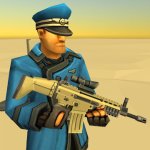
Delta Touch is a unique emulator that helps users experience Doom games right on their phones. With many special features and offers the best configuration for players to experience their game versions.
![Delta Touch [7 x Doom engine source port]](https://modyolo.com/wp-content/uploads/2022/02/delta-touch-7-x-doom-engine-source-port-1.jpg)
Delta Touch v6.2.1 APK (Paid)
| App Name | Delta Touch |
|---|---|
| Publisher | Open Touch Gaming |
| Genre | Action |
| Size | 88M |
| Latest Version | 6.2.1 |
| MOD Info | PAID/Patched |
| Get it On |

|
This Delta Touch MOD APK provides a patched version of the application, enabling access to the full feature set without the requirement of a standard store purchase. The modification focuses on bypassing the licensing check to allow the emulator to function as a paid build.
What’s Modified in Delta Touch
- The application is patched to provide access to the paid features of the emulator without a store-verified purchase.
![Delta Touch [7 x Doom engine source port]](https://modyolo.com/wp-content/uploads/2022/02/delta-touch-7-x-doom-engine-source-port-2.jpg)
The current build is version 6.2.1 with a file size of 88M under the package name com.opentouchgaming.deltatouch, and because it is a re-signed file, it cannot be installed as an update over the original version from the store.
About Delta Touch
Delta Touch is an engine that allows older DOOM titles to run on certain mobile hardware. It is not a complete game, but rather a shell that requires users to provide their own game data (WAD files). Classic DOOM games (and many other older FPS games) include data and assets in WAD files (levels, textures, sounds, etc.). Once users provide the WAD files, they can then play the game for as long as they want. Because users can provide any game data they want, Delta Touch allows classic DOOM games to be portable on mobile devices. The application acts as a bridge to extend the legacy of older DOOM titles. Using Delta Touch MOD APK, users can emulate older titles of DOOM on portable devices.
Delta Touch allows for full customization of the touchscreen user interface. Buttons can be changed or added to best fit the users hand size or preference. Unnecessary or cluttering operations can be removed for a cleaner interface. A set of 18 buttons are also provided to GZDoom users. These buttons are to simulate the complex keyboard and mouse controls and replicate the functions of a keyboard and mouse setup for the GZDoom engine. Some users may prefer the complexity of a keyboard and mouse over a mobile device touchscreen, especially for faster paced FPS titles. Overall Delta Touch is an incredibly powerful emulator and gives a lot of control to the users for customization of the game and the user interface.
![Delta Touch [7 x Doom engine source port]](https://modyolo.com/wp-content/uploads/2022/02/delta-touch-7-x-doom-engine-source-port-3.jpg)
The program incorporates a virtual keyboard. With this function, players no longer require physical peripherals to generate commands. A control panel can be generated with virtual commands. This function is especially beneficial when players attempt to perform advanced or additional actions within the game. The program also utilizes an advanced rendering technique known as multi-threaded rendering. The purpose of this technique is to enhance the performance and visual quality of the application. As discussed previously, high resolution graphics within the game are essential for identifying enemies from a great distance. The program also incorporates gamepad support, thus allowing players to utilize gamepads for both menu navigation and gameplay.
This application supports the base games, as well as mods, i.e. RoE, and classic doom 3. These mods allow players the ability to extend equipment and weapons within the game, providing an additional layer of variety and keeping the gameplay engaging for long periods of time. Mods also allow the users to have the control over what content they wish to load. In essence, they are turning their mobile device into a doom engine content delivery platform. For fans of classic games, this is an extremely sought after feature.
![Delta Touch [7 x Doom engine source port]](https://modyolo.com/wp-content/uploads/2022/02/delta-touch-7-x-doom-engine-source-port-4.jpg)
Resolution management is done by using switchable profiles. Using these profiles, users can zoom in or out, tweaking the visual output according to their preferences or the capabilities of the hardware being used. For users who have problems setting up the application or using the game interface, special assist goals have been included. Delta Touch helps users get through the base games to familiarize them with the touch controls to ease the learning curve and remove obstacles in the flow of the gameplay. Delta Touch works by emulating an x86 architecture on ARM. It enables legacy PC games to run on touchscreen devices by providing additional features to improve graphical fidelity and control, bridging the gap between classic PC and modern mobile devices. The mod support and multiple engine support further enable users to customize and tweak the games to their preferences. This gives users the flexibility of a modern PC in a convenient mobile form factor.
Key features
- Customizable touchscreen controls with layout adjustment
- 18 separate custom buttons specifically for GZDoom
- Built-in keyboard for virtual control commands
- Multi-threaded rendering for high-resolution graphics
- Gamepad navigation and control support
- Support for RoE and classic doom 3 mods
- Switchable resolution profiles with zoom functions
- Unique assist goals for base games
![Delta Touch [7 x Doom engine source port]](https://modyolo.com/wp-content/uploads/2022/02/delta-touch-7-x-doom-engine-source-port-5.jpg)
Related MOD APKs
FAQ
What does Delta Touch MOD APK unlock?
This 6.2.1 version of Delta Touch includes PAID and Patched modifications. It functions similarly to the Open Touch Gaming release. Your changes become active immediately after you finish installing the app.
What is the latest version of Delta Touch MOD APK?
Version 6.2.1 is current, following the June 7, 2025 update from Open Touch Gaming. We don’t keep older versions here. Install this build over your current app to update. If you see a signature conflict error, you must uninstall your previous version first.
Is Delta Touch MOD APK safe to download?
This Delta Touch 6.2.1 build on MODYOLO modifies the Open Touch Gaming app with PAID and Patched features. 312 users gave it a 3.5/5 rating. It does not require root. You might see a Play Protect warning, so always download from this page.
Can I use Delta Touch MOD APK on PC or iPhone?
You cannot install this Android file on an iPhone. To use the 88M file on a computer, use an emulator like BlueStacks or LDPlayer. Simply install the software and drag the package into the window to start.
Delta Touch v6.2.1 APK (Paid) Download
Download (88M)You are now ready to download Delta Touch for free. Here are some notes:
- Please read our MOD Info and installation instructions carefully for the game & app to work properly
- Downloading via 3rd party software like IDM, ADM (Direct link) is currently blocked for abuse reasons.
3.5/5 (313 votes)