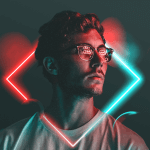
Make beautiful works of art with DripArt MOD APK. Generate one of a kind drip effects and filters, and use the collage maker for that extra artistic touch.

Make beautiful works of art with DripArt MOD APK. Generate one of a kind drip effects and filters, and use the collage maker for that extra artistic touch.
| App Name | DripArt |
|---|---|
| Publisher | Lyrebird Studio |
| Genre | Photography |
| Size | 53M |
| Latest Version | 3.0.0 |
| MOD Info | Premium Unlocked |
| Get it On |

|


This DripArt MOD APK provides a version of the application with the Premium features unlocked. It allows users to access the full range of professional editing tools and artistic effects without the limitations found in the standard release.
This build is version 3.0.0, has a file size of 53M, and uses the package name com.lyrebirdstudio.collage_frame; because it is a re-signed file, it cannot be installed as an update over an existing version from the official store.
DripArt, a photography tool by Lyrebird Studio, helps users turn regular photos into digital art. Located in the photography category, the tool focuses on users with a limited understanding of graphic design and provides features that allow users to edit their images to a more professional level. The tool provides a way to improve visuals for social media, and other places, to better enhance the user’s online presence, or personal brand. The tool helps users interact in an efficient way to create a great quantity of images with a lot of variety. With a focus on art and technology, the team aims to create a stylish and timeless effect that is aesthetically pleasing to the user, as well as to others.
The Drip Lab is software that allows users to create a specific style of photo that has become trendy on social media. The effect creates an image that appears to be made up of liquid paint. Users of the Drip Lab can take a new picture to work on, or they can choose an existing picture from their photo gallery. After a photo is loaded, users can apply and adjust drip effects to their liking. Like other forms of photo editing software, this program allows users to make adjustments based on their preference. For drip effects, this includes size and placement. When the effect is altered and added to a photo, it often makes a picture appear professionally done. Unlike other sketch style effects, this software lets users edit images and ensures that important elements of the subject aren’t covered up. This can increase the chances of a picture looking artistic and attractive rather than being juvenile and unimpressive.
In addition to the tools specific to drips, the application provides a range of Laid Over Effects. These effects go beyond simple filters to provide different layers and depth to a photo. Examples of these effects include art that is cut and split and placed in a random order, neon art elements and spirals. It is possible to superimpose different styles to form a more complex design. For example, a user can add a neon glow to a background and superimpose a spiral design. The toolset is enriched by a collection of professional filters. Unlike the other filters, these are of high definition, and are curated to provide different tones. These filters can be useful in adjusting the lighting and the overall mood of a photo. The toolset is enriched further to allow a user to easily achieve a desired visual outcome, be it a more subdued shot or an upbeat, high-energy, vibrant photo, or an image that captures a mood that is in between. The filter set provides presets to help achieve these end results.
The program has a photo collage maker function. Photo collages are used to combined multiple memories or pictures in a single frame in a story telling or an aesthetic way. Collages, in a way, are a nice way to summarize a lengthy post. The collage tool enables the user to select a number of pictures and arrange them in a number of grids and various layouts. The program also has a function that lets the user adjust the borders of the pictures in the collage. Adjusting borders gives the user control over spacing, and therefore, control of the overall look of the picture that is framed by the collage. This tool can be used to summarize lengthy posts and can also be used to create themed posts as well as profile pictures that stand out.
Editing tools let users make precise adjustments to image elements. These tools appear as sliders in the editing interface for adjustments to elements such as sharpness, saturation, brightness and contrast. These tools come in handy for achieving the base required image quality before or after advanced effects are added. The background editor tool provides functionality for isolating subjects and changing the background of the shot. It can remove or replace the background of an image in a few seconds. The technology is useful for placing a subject or object in a completely different environment, or for removing a distracting background to enhance focus on the subject.
The versatility of the application is further demonstrated by its ability to export high-quality images ready for digital display. After editing, the application allows for direct sharing to multiple social media platforms, thereby ensuring the quality of the images is not compromised as they are transferred from the application to the social media platforms. Hence, DripArt is a digital art companion which continues to evolve to offer tools to its users for creating visually appealing content. From creating professional profile pictures to complex digital art collages, the effect and background manipulation options, coupled with standard editing adjustments give the users numerous options at their disposal. With DripArt MOD APK users are armed with the power to produce professional art digitally with ease.
Related MOD APKs
Is Premium unlocked in DripArt MOD APK?
This DripArt (3.0.0) build features Premium Unlocked. It functions like the Lyrebird Studio release, with all modifications active immediately after installation.
What is the latest version of DripArt MOD APK?
Version 3.0.0 is current, matching the Lyrebird Studio release from June 12, 2026. We don’t keep older versions here. Install this file over your current app to update; uninstall first if signature conflicts occur.
Is DripArt MOD APK safe to download?
This DripArt 3.0.0 build from Lyrebird Studio includes Premium Unlocked. 4 users gave it a 3/5 rating. It does not require root. Play Protect warnings are expected, so always download from this page.
Does DripArt MOD APK remove the watermark?
This build features Premium Unlocked. Watermark-free export is a Pro feature in DripArt; check the export screen after you install the app to confirm functionality.
You are now ready to download DripArt for free. Here are some notes: