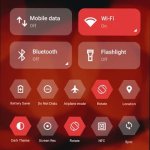
Transform your android device, giving it the clean, elegant look of an iOS device! Enjoy the benefits of 25,000+ premium 2K resolution, white icons to give your device a clean, modern aesthetic!


Transform your android device, giving it the clean, elegant look of an iOS device! Enjoy the benefits of 25,000+ premium 2K resolution, white icons to give your device a clean, modern aesthetic!
| App Name | iWhite OS Icon Pack |
|---|---|
| Publisher | PizzApp Design |
| Genre | Personalization |
| Size | 55M |
| Latest Version | 7.3 |
| MOD Info | Full Version |
| Get it On |

|


The iWhite OS Icon Pack MOD APK unlocks the Full Version of the application, providing immediate access to the complete suite of premium icons and customization tools. This modification removes the restrictions typically associated with the standard release, allowing for a fully themed interface without additional requirements. It is designed for users who want the entire library of visual assets available from the start.
This build is version 6.7 with a file size of 55M under the package name com.italiano.iwhite, and because it is re-signed, it cannot be installed as an update over an existing version from the official store.
The iWhite OS Icon Pack MOD APK provides a complete makeover for Android devices, giving users a look similar to Apple’s iOS. Android allows for greater functionality and customization when compared to iOS. Many users appreciate the aesthetic principles of iOS and this iWhite OS Icon Pack facilitates this. The pack embodies the vision of refining the elegance of Apple’s designs to other OSes, focusing on a high-end, clean, and minimalist design. With this pack of icons, users can improve the overall design of their device and replace unrefined and inconsistent system icons with a unified and artistic design. Although the pack is focused around improving the design of a device’s interface, the overall goal is to simply provide a professional and clear design throughout the device. It seeks to solve the problem of an overly cluttered and distracting design by providing a clear and minimalist design.
This icon pack provides thousands of icons to offer a complete theming solution for your Android device. With over 25,000 icons at 300×300 resolution, this pack covers a huge library of apps, including 3rd party applications, providing a consistent visual theme to the user’s app drawer. By choosing a higher resolution, pixelation becomes less of a concern, providing crisp, clean edges to icons on mobile devices with QHD and 4K displays. Because of the focusing on high-defintion rendering, this pack’s icons are crisp at any pixel density. This pack also provides themed support for over 45,000 apps, providing a White, minimalist aesthetic to nearly the entire device. This leads to improved performance, battery life, and RAM management.
A major downside of using third-party icon packs is dealing with apps that don’t support the pack and don’t align with the selected theme. iWhite OS Icon Pack solves this issue with clever masking techniques. It uses a circular white theme for masking. This means that for apps that don’t have custom icons in the library, the package will apply a circular mask of white and assign it a white color profile. The effect of this is that the user interface appears seamless and gorgeous, and, more importantly, doesn’t feature disjointed and distracting icons. The package achieves the same effect for the home screen as well, and to compliment the white icons, it includes a set of dark iWhite wallpapers. The wallpapers feature a minimalist design to achieve a high level of contrast. This enables the white icons to ‘pop’ and stand out from the background. Lastly, the masking package aims to achieve a professional look for the user interface by balancing the iWhite foreground icons and background wallpapers.
icons.pack’s features extend beyond static images. Dynamic elements respond to the device’s state and provide additional functionality. For example, there is real-time dynamic calendar support. With this feature, the calendar icon can change to reflect the current date and provides a heads-up display of the user’s schedule. The feature works with the system and Google Calendar, improving the user interface. Users can manage these features from a hub (which is a clean, modern design dashboard) and perform functions like searching for a specific icon in the 25,000+ icon library, applying themes to their launchers, and other actions to improve the customization of their phone. All of this is available from the centralized control center.
The developer takes integration with the Android ecosystem seriously, therefore providing better support for more popular third-party launchers. This pack offers support for launchers such as Nova Launcher, Action Launcher, Apex Launcher, Smart Launcher and Microsoft Launcher, to name a few. To use the theme users just need to select the engine of their preferred launcher. Some users may find that their most used apps are still missing from the high-definition library. For these cases, the pack provides a feature known as Icon Request. This allows users to submit a request for white list versions of apps that are missing. This design philosophy gives the icon pack a clean, white look. It also demonstrates the designers commitment to provide users a way to keep the icon pack up to date.
The iWhite OS Icon Pack provides a luxury aesthetic upgrade to users looking to enhance the appearance of their smartphone with an attractive and modern design. This pack targets two main types of users. The first type of user prefers to have a clean user interface (UI) that eliminates the digital distractions associated with busy designs. The other type of user prefers the combination of the elegance of iOS and the flexibility of Android. The iWhite OS Icon Pack is designed to incorporate thousands of icons to provide a dynamic and flexible system that resolves the problem of an inconsistent user interface. The pack is designed to help users maintain digital organization, clarity, and minimalism. The combination of the extensive library of icons and the masking mechanics helps achieve this over the life of the device as users install and add new software to their device.
Related MOD APKs
What does iWhite OS Icon Pack MOD APK unlock?
In this build of iWhite OS Icon Pack (6.7), the following is modified: Full Version. Everything else works like the official PizzApp Design release, and the changes are live as soon as you install.
What is the latest version of iWhite OS Icon Pack MOD APK?
The current build is v6.7, matching PizzApp Design’s release, last updated on June 9, 2026. We don’t keep older versions here. To update, install the new build from this page over the existing one; if Android reports a signature conflict, uninstall the old build first.
Is iWhite OS Icon Pack MOD APK safe to download?
iWhite OS Icon Pack MOD APK v6.7 on MODYOLO is PizzApp Design’s original app with only Full Version modified. 13 users have rated it 3.6/5 here. It does not require root. A Play Protect warning during install is expected, so always download from this page.
Can I use iWhite OS Icon Pack MOD APK on PC or iPhone?
This is an Android package, so it won’t install on iPhone or iPad. On Windows or macOS you can run the 55M APK in an Android emulator such as BlueStacks or LDPlayer—install the emulator, then drag the file in.
You are now ready to download iWhite OS Icon Pack for free. Here are some notes: