Smart Launcher 6 Mod APK is an excellent enhancement in users’ interaction with the home screen or the system in their default device. It also grants exceptional innovation in interacting through a customizable launcher.


Smart Launcher 6 v6.7.build.021 MOD APK (Pro Unlocked)
| App Name | Smart Launcher 6 |
|---|---|
| Publisher | Smart Launcher Team |
| Genre | Personalization |
| Size | 15M |
| Latest Version | 6.7.build.021 |
| MOD Info | Premium Unlocked, Extra |
| Get it On |

|
This Smart Launcher 6 MOD APK provides access to the premium unlocked features and includes additional extra content for deeper interface personalization. It removes the restrictions found in the standard version, allowing for full use of the advanced customization tools and system integrations.
What’s Modified in Smart Launcher 6
- Premium Unlocked status grants access to all paid features and advanced personalization tools within the application.
- Extra content is included to provide more options for visual customization and layout design.
 |
 |
This build is version 6.6 build 020 with a file size of 15M and the package name ginlemon.flowerfree; because it is re-signed, it cannot be installed as an update over the version available on the official store.
About Smart Launcher 6
Smart Launcher 6 aims to provide an enhanced user experience through modifications to core interactions of an Android device. The primary goal of this launcher is to reduce the effort spent by a user to find and open the applications they want to use. The launcher achieves this through its automated application organization system. This system processes all the applications installed on the device and groups them in a logic manner. As a result, the launcher removes clutter from the home screen to maintain a clean and professional look. The design of Smart Launcher 6 embraces a one-finger control style. As a result, all the interactions in the launcher, from opening the app drawer to modifying settings, are designed to be controls that can be accomplished by a single finger. This focus on interaction design can be evident in the home screen of the launcher as well. Users have the freedom to place applications in any position on the home screen and do not conform to a strict grid structure.
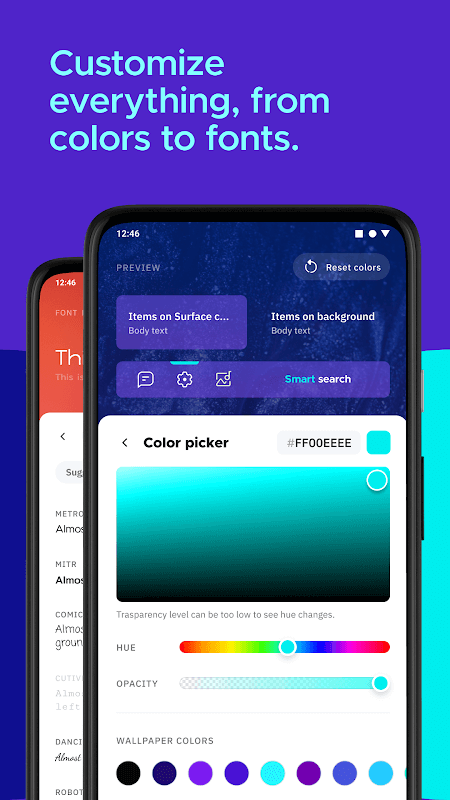
This app focuses on user experience and visual customization. Icon packs aren’t just pictures to be slapped onto the home screen. Each pack comes with a unique style. When an icon pack is selected, the app automatically replaces the icons for all the apps on the home screen. For further customization, users can create and use their own icons. As if that weren’t enough, the app offers a ton of wallpapers, and color palettes, so you can build a complete theme to your liking. All these features help users express their individuality and go beyond stock Android.
 |
 |
The launcher excels with the fluidity of its user interface. Smooth animations are used throughout, whether it be accessing the main menu or interacting with the notification bar. Supporting this fluid interface is a host of performance improvements and optimizations to give the launcher a soft and friendly user interface. Within the launcher are extensions that build on top of the native systems in Android and provide additional shortcuts and menu options. By optimizing all these interactions and reducing friction associated with interacting with system menus and controls, the application aims to make using the device a more pleasant experience.
In this launcher, the same treatment for flexiblity with app icons has been extended to widgets. The gridless widget system is a major change to traditional launcher behavior. In traditional launchers, widgets are restricted to blocks and, therefore, cannot extend beyond the block’s boundaries. Keeping that in mind, complete flexibility given to widgets in this launcher enables users to totally resize the widgets and move them anywhere on the home screen. Furthermore, the launcher, supports the stacking of widgets. As a result, users can overlap multiple widgets to save space while maintaining essential information on the home screen. In addition, there is also the option to create additional pages. Each of these pages can be customized with widgets or app shortcuts. These widgets act like small versions of native apps to provide information in an easy to consume format. Users can see the latest calendar event, media controls, and the latest weather on the home screen. The launcher enables users to keep the most important information on the home screen while hiding or tucking away less important information in pages or using gestures to access it.
The app has a range of sophisticated templates for those who want to fully customize their mobile experience. These templates act as a base to build completely new home screen layouts, and help integrate some useful add-on functions which are not available in the default system. People with habits of frequent usage of certain system functions or communication apps can use the templates to develop an interface which facilitates quicker and easier access to those features. Thus, the templates not only allow the development of a completely new launcher style, but also help refine the existing style to better suit user preferences. The templates integrate a range of designs from ultra-minimalist to rich, and help expand the personalization of the home screen to a whole new level. Hence, users get an opportunity to go beyond the plain swapping of wallpapers and icons to alter their user experience in a profound way.
 |
 |
The launcher allows users to experience major improvements regarding their interaction with their mobile device. It enables users to make changes to their home screen and provides ample options for customization. It offers a different interaction model where the user is not restricted to a grid. The launcher also automatically organizes apps and suggests the best location to place app shortcuts and functions. One-finger interaction is made possible by the launcher. It provides the user endless opportunities to customize both icons and widgets to achieve the desired look, feel, and functionality of their home screen. Free wallpapers, over 1,000,000 colors, and the ability to stack widgets make the launcher one of the most comprehensive and robust launchers available. The launcher supports users who wish to gain complete control over their app launcher and home screen. It makes it possible to easily create a customized, organized, and unique look and feel. The launcher is lightweight and does not consume a lot of device resources.
Key features
- Automatic app organization into categories.
- Gridless application placement and layout.
- Icon pack support with personal image integration.
- One-finger control optimization for system navigation.
- Gridless and stackable widgets for information display.
- Customizable home screen templates with add-on functions.
- Fluid grid interface for menus and notification bars.
 |
 |
Related MOD APKs
FAQ
Is Premium unlocked in Smart Launcher 6 MOD APK?
This Smart Launcher 6 (6.6 build 020) release features Premium Unlocked and Extra. It works exactly like the Smart Launcher Team version, with all modifications active as soon as you finish installation.
What is the latest version of Smart Launcher 6 MOD APK?
The current version is 6.6 build 020 from Smart Launcher Team, updated April 2, 2025. We don’t keep older versions here. Update by installing this file over the current one. If you see a signature conflict, uninstall the old app first.
Is Smart Launcher 6 MOD APK safe to download?
This Smart Launcher 6 6.6 build 020 package is the Smart Launcher Team app with Premium Unlocked and Extra features added. 297 users gave a 3.7 rating. It does not require root. Expect a Play Protect warning during setup; always download from this page.
Can I use Smart Launcher 6 MOD APK on PC or iPhone?
This Android app will not install on iPhone. You can run the 15M APK on a PC or Mac using an emulator like BlueStacks or LDPlayer. Install the emulator software, then drag the file into it to start.
Smart Launcher 6 v6.7.build.021 MOD APK (Pro Unlocked) Download
Download (15M)You are now ready to download Smart Launcher 6 for free. Here are some notes:
- Please read our MOD Info and installation instructions carefully for the game & app to work properly
- Downloading via 3rd party software like IDM, ADM (Direct link) is currently blocked for abuse reasons.
3.7/5 (297 votes)