Edge Lighting Borderlight Mod APK – Take pleasure in a wide selection of breathtaking live wallpapers and vibrant EDGE lighting borders.

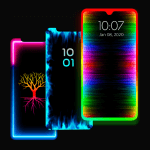
Edge Lighting - Borderlight v3.3.24 MOD APK (Premium Unlocked)
| App Name | Edge Lighting - Borderlight |
|---|---|
| Publisher | ZipoApps |
| Genre | Personalization |
| Size | 12M |
| Latest Version | 3.3.24 |
| MOD Info | Premium Unlocked |
| Get it On |

|


This version of the application provides users with all premium features fully unlocked from the start. By using the Edge Lighting MOD APK, you gain access to the complete set of customization tools and lighting effects without restricted menus or locked content.
What’s Modified in Edge Lighting
- The premium features of the Edge Lighting MOD APK are fully unlocked, allowing access to all settings.
This build is version 3.3.24, has a file size of 12M, and uses the package name com.pixelkraft.edgelighting; it is a re-signed file and cannot be installed over an existing version from the official store.
About Edge Lighting
Edge Lighting – Borderlight offers Android users the ability to upgrade the design of their home and lock screens by creating a sophisticated light glow along the edges of their display. Borderlight works on a wide variety of hardware and is compatible with various display technologies, regardless of the manufacturer. The software works with the Samsung Galaxy S10, S20, and Plus models, as well as handsets by OnePlus, Xiaomi Mi and Redmi, Nokia, Oppo, and Vivo. Once integrated with the device’s display settings, the software is able to continuously light the edges of the display to frame the user interface. This edge lighting is not limited to the traditional rectangular displays, but is also compatible with more modern displays such as Notch, New Infinity, Infinity, and others. Users are able to activate edge lighting effects to run as live wallpapers, which provides a constantly changing, dynamic visual display on the edges of the screen. Edge lighting does not interfere with the primary function of the device. The software provides a means to create a continuously changing, dynamic, and colorful interface for the user.
The customization engine focuses on the control the user has over how the light appears and behaves. There are a variety of settings for EDGE lighting that let the user change the color, width, and type of border. For the border color, users have the option of selecting RGB colors in order to match the color of the lighting to their preferred device theme. Beyond simple color choices, the app allows users to select from various animation speeds to achieve a rapid, pulsing light or a subtle, slow transition. The width of the border can be adjusted to increase or decrease the prominence of the light. The size of the curves at the top and bottom of the screen can be adjusted in order to fine tune the lighting to the true physical corners of the device. The purpose of these settings is to allow the user to customize the lighting to best conform to the contours of their device and integrate the light with their hardware.
This software has over 15 varieties of EDGE lighting borders, moving beyond simple line borders. Recognizable shapes and symbols include hearts, birds, and the sun and even lotus flowers. For seasonal and environmental themes, users can select borders in the shapes of snowflakes, dolphins, beach trees, and flowers. Other fun and creative designs including smiley faces, the Om symbol, and Christmas trees. Each border style can be customized using the standard color and speed settings to produce infinite variations on the display. Thanks to this wide variety of borders, users are able to customize the lighting for different seasons and holidays to align with their interests.
The application accounts for the various display notches by offering specific settings to suit them. Users can adjust notch height and width and top and bottom radii. The application is also optimized for processing and includes battery saving options. Because of these settings, the user can keep the fun and colorful RGB lighting running all day without having to worry about killing the battery in the process. The Magical EDGE lighting effects include 30+ lighting transition and styles which are accessible with a single touch to the home or lock screen.
The application features background device integrations. Users can utilize 4K backgrounds for their lighting setups, so that the imagery behind the borders remains at the highest resolution. Users can also use the software to employ backgrounds for the EDGE lighting panel with their own personal photos, thereby offering a fully customizable home screen. If other apps take precedence over the lighting app, a user can configure the lighting panel to accomplish a desired effect, thus creating an appealing and useful environment. Thousands of configurations are available from the use of live wallpapers, different imagery, and various border shapes. Users can start from scratch to build a lighting configuration, or utilize the app to adjust existing presets such as the enchanted lighting configurations. The app leverages an extensive settings menu and tools to allow users to customize their lighting displays. However, the app focuses on core features such as delivering an efficient lighting experience to users so that they can personalize the lighting displays on their devices.
Key features
- Customizable RGB edge lighting colors
- Animation speed and width controls
- Top and bottom curve radius adjustments
- Display notch settings for width and height
- Over 15 border styles including hearts and snowflakes
- Magical EDGE Lighting effects
- 4K background integration
- Custom photo backgrounds for lighting panels
- Battery-saving options
- Compatibility with Notch, New Infinity, and Infinity Displays
Related MOD APKs
FAQ
Is Premium unlocked in Edge Lighting – Borderlight MOD APK?
This build of Edge Lighting – Borderlight (3.3.24) features Premium Unlocked. It functions like the ZipoApps release, and these modifications are active as soon as you install the app.
What is the latest version of Edge Lighting – Borderlight MOD APK?
Version 3.3.24 matches the ZipoApps release from June 17, 2026. We don’t keep older versions here. Update by installing this build over your current app; if a signature conflict occurs, uninstall the old version first.
Is Edge Lighting – Borderlight MOD APK safe to download?
This Edge Lighting – Borderlight 3.3.24 file is the ZipoApps original with Premium Unlocked added. 3 users rated it 4/5. It does not require root. Ignore Play Protect warnings during installation and always download from this page.
Can I use Edge Lighting – Borderlight MOD APK on PC or iPhone?
Because this is an Android package, it cannot be installed on iPhone. To run the 12M APK on a computer, use an emulator like BlueStacks or LDPlayer; simply install the software and drag the file in.
Edge Lighting - Borderlight v3.3.24 MOD APK (Premium Unlocked) Download
Download (12M)You are now ready to download Edge Lighting - Borderlight for free. Here are some notes:
- Please read our MOD Info and installation instructions carefully for the game & app to work properly
- Downloading via 3rd party software like IDM, ADM (Direct link) is currently blocked for abuse reasons.
4/5 (3 votes)