This build of Launcher 10 MOD APK provides access to the premium features of the application, removing the restrictions found in the standard version. It is designed for users who want the full suite of customization options for their device interface without additional requirements.
What’s Modified in Launcher 10
- Unlocks the premium features of the application, allowing for complete access to all personalization and interface settings.
This Launcher 10 MOD APK is version 2.8.19, has a file size of 20M, uses the package name com.nfwebdev.launcher10, and is a re-signed build that cannot be installed over a version from the official store.
About Launcher 10
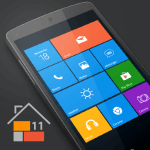
Launcher 10 is an app made by nfwebdev that customizes Android devices to emulate the look of the Windows Phone operating system. Users that have previously used a mobile device with Windows have fond memories of the unique layout and patterns of that operating system. Since the mobile world has primarily moved to Android, this app allows users to have that old and familiar experience. Users can set this app as their default launcher to gain the above functionality. It reorganizes the home screen to display tiles as opposed to the traditional Android grid of icons. The goal is to bring the users of Windows mobile phones a system that utilizes the organization and layout of Windows, thereby enabling them to use their smartphones as they previously used their mobile devices.
The home screen design uses “tiles” which can be heavily customized. Users can pin any apps on their device directly to the start screen to create a custom grid of frequently used apps. Unlike icons, tiles can be varied in size and can be positioned freely. The app allows users to insert widgets to tiles, using the tile interface to incorporate standard Android features. This allows users to view app data without opening the app. Similar to standard Windows concepts, the app aims to provide an easy to use, responsive operating system, with as less restrictions as possible. Users can pin and arrange apps the way they want, enabling them to create an efficient workspace the way they want it, based on their usage habits.
Moving past the main screen, the app provides an advanced management system for apps, which is accessed using a right swipe gesture. This function lists all the apps on the phone and can help quickly discover and launch apps. This listing, rather than page, provides a different way to organize apps compared to other phone launchers. In this management function, the app provides ways to handle recently installed apps, hence making them easily accessible. There is also an app search function, which can help locate apps by name. This is especially helpful when a user has a large number of apps on their phone. The app also provides ways to manage hidden apps. If apps are hidden from the main start screen, they can still be accessed and managed by the centralized list.
Extensive personalization is a hallmark of the software. Users can edit nearly every component of the interface. Start screen tiles can be individually modified. Users can assign wallpapers to be placed behind the user interface, and select icons to be placed on the tiles. Each of these can be modified to suit users’ preferences. Users can choose from various icon packs to suit their preferences and desired themes. These icon packs are often bundled together, meaning that users have many options when it comes to theming their devices. Users can adjust the size of the tiles to achieve a desired hierarchy on the home screen. Unlike other mobile operating systems, users are given extensive control over the interface, allowing them to tailor the interface as per their preferences. Users can downsize tiles to be less prominent, or enlarge them to be highly visible. By downsizing tiles, users can hide lesser used tiles.
The application provides support for various viewing environments with its light and dark modes. The modes are easily switchable to make the phone comfortable to use at any time. The dark mode reduces eye strain in low-light environments. The light mode increases visibility in high-light environments. The application also provides advanced customization for the window panes or tiles. Users can set a default color for the tiles. Users can also set the tiles to be fully transparent to allow the wallpaper to show through and create a layered effect. The color and transparency options are applied to the entire application, therefore, if the color options are changed, then the list of applications to manage is changed as well.
Key features
- Windows Phone style home screen interface
- Tile pinning and resizing
- Widget support within tiles
- Right-swipe app list navigation
- Application search functionality
- Recently downloaded app management
- Hidden application management
- Custom icon and wallpaper support
- Built-in icon image packs
- Light and dark display modes
- Tile transparency and color customization
Related MOD APKs
FAQ
Is Premium unlocked in Launcher 10 MOD APK?
This version 2.8.19 of Launcher 10 features Premium Unlocked. Aside from that, it works just like the nfwebdev release, and the modifications are active as soon as you finish installing the app.
What is the latest version of Launcher 10 MOD APK?
The current 2.8.19 build matches the nfwebdev release from July 26, 2025. We don’t keep older versions here. To update, install this file over your current app; if you see a signature error, uninstall the old version first.
Is Launcher 10 MOD APK safe to download?
A Play Protect warning is expected during installation, so always download from this page. This Launcher 10 2.8.19 build on MODYOLO is the nfwebdev app with Premium Unlocked. 12 users rated it 3.9/5 here. It does not require root.
Can I use Launcher 10 MOD APK on PC or iPhone?
As an Android package, this won’t work on an iPhone or iPad. To run the 20M APK on Windows or macOS, use an emulator like BlueStacks or LDPlayer. Simply install the emulator and drag this file in.