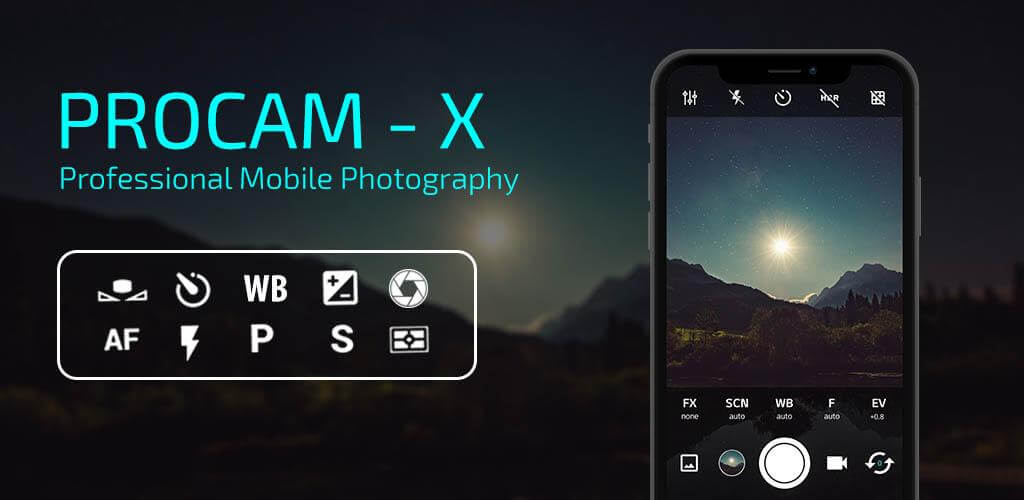


This ProCam X MOD APK provides immediate access to the paid version of the professional camera application without requiring a separate purchase. It unlocks the full suite of manual photography tools and high-resolution video features intended for the premium edition of the software.
What’s Modified in ProCam X
- Paid version unlocked to provide full access to all professional camera features and manual controls.
 |
 |
The ProCam X MOD APK version 1.29 has a file size of 3.7M with the package name com.intermedia.hd.camera.pro, and because this file is re-signed, it cannot be installed over an existing copy from the official store.
About ProCam X
ProCam X by Imagi Mobile is a program that converts mobile hardware into an advanced professional-grade photography device. Traditional camera applications usually offer little manual control, mimicking an automated system like that of a basic camera. ProCam X offers control similar to a high-end, professional camera. It provides the user control over almost every aspect of capturing an image, including light. Other features of the application let the user manually set the exposure and white balance, to ensure that the output images reflect the exact vision of the user. The application pushes the hardware of the device to its limits to ensure that the output is of high definition, regardless of the user’s skill. The application is designed to keep the indicators required to capture still and moving images, professional control system, at the forefront of the interface.
There is a good deal of real estate devoted to light management in the form of exposure and white balance controls. Exposure gives the photographer full control over how much light strikes the image sensor. There are multiple ways to utilize exposure control to one’s advantage. If a user happens to locate a good spot of lighting, they can lock exposure settings to prevent the software from making unwanted adjustments during the shoot. White balance control allows users to adjust for different light temperatures. There are multiple manual oversights that facilitate white balance adjustment. Ultimately this allows for greater control over the image’s color. Good color is essential to creating cohesive visual themes across different subjects and/or environments. Photographers can utilize the controls detailed in the above paragraph to build visuals that speak to the autonomy, self-sufficiency, and consistency needed for themes to be cohesive across multiple contexts and/or environments.
For users that prefer a more traditional method, the app provides options for manual ISO adjustment and manual focus. Manual focus is also useful for photographing distant subjects or to emphasize a particular subject when shooting a busy scene (autofocus may ignore the subject). The app offers tools to assist with these adjustments, namely a Histogram and zebra stripes. A Histogram displays the tonal range of an image and helps identify blown out highlights or blocked up shadows. Zebra stripes help identify over exposed areas. Zebra stripes and Histograms are often found on high end DSLR and Mirrorless cameras, and are useful tools for fine tuning exposure. These tools help increase the quality of mobile photos and help achieve a more professional look.
The app moves beyond still photography and incorporates high speed, high resolution video recording. The continuous shooting mode (or burst mode) is a feature that allows the user to capture numerous still photographs quickly in rapid succession. This mode forms the basis of functions to create custom animations as well as time lapse videos. 4K video is supported, assuming the hardware can support it. One differentiating feature of the app is the integration of the audio recording function to ensure audio is captured along the video. The app is designed to replace numerous video and photo processing and editing applications. It is capable of capturing a plethora of frames in a short time making it well suited for capturing quick, but sharp, movements.
 |
 |
Users can choose from different custom modes like anti-shake to prevent photo blur, or a facial recognition mode that helps to capture portraits. Users can easily change the shooting direction and continue to shoot without interruption, adapting to different situations. The app offers a rich set of professional camera tools and helps experienced users as well as beginners to learn to control the camera in a manual way. The interface helps to show critical controls like shutter speed to help users make quick adjustments while taking a photo. The app offers plenty of manual controls as well as automated features, making it a suitable app for both spontaneous as well as pre-planned shots.
The app provides plenty of features that help show depth in a photo, as well as teach users about the principles of photography. The app is powerful yet compact, and offers plenty of features in an easy to use way. It helps users gain control over exposure, focus, and color features of their camera and better understand the photography principles to move away from the ‘point and shoot’ method. The app acts like a digital darkroom, giving users complete control over the final image.
Key features
- Histogram for tonal distribution monitoring
- Zebra stripes for overexposure detection
- Manual exposure control and exposure locking
- White balance (WB) control for color accuracy
- Manual ISO speed adjustment
- Manual focus for distant or specific subjects
- Manual shutter speed adjustment
- Continuous shooting mode (Burst mode)
- Time-lapse video creation capabilities
- 4K video recording with high-quality audio
- Facial recognition mode
- Anti-shake mode for stabilized handheld shots
- Real-time distance indicators for focus alignment

Related MOD APKs
FAQ
What does ProCam X MOD APK unlock?
In this ProCam X 1.29 build, the feature modified is: PAID. It functions the same as the Imagi Mobile release, and all changes apply once you install.
What is the latest version of ProCam X MOD APK?
Version 1.29 matches the Imagi Mobile build from November 2, 2025. We don’t keep older versions here. To update, install this over your current app. If you see a signature conflict, uninstall the old one first.
Is ProCam X MOD APK safe to download?
This ProCam X 1.29 build on MODYOLO is the Imagi Mobile app with PAID features. 65 users rated it 3.8. It does not require root. Since Play Protect might flag it, always download from this page.
Can I use ProCam X MOD APK on PC or iPhone?
As an Android package, it will not work on an iPhone. To run the 3.7M APK on a computer, use an emulator like BlueStacks or LDPlayer by dragging the file into the software.